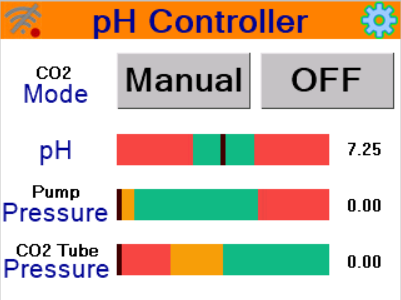
Turn on the power switch. Wait a moment for the system to boot up. The main screen will appear as shown. Set the mode to Manual and CO₂ status to OFF to prevent the system from operating until all settings are configured.
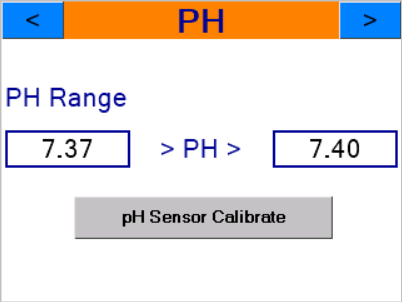
Press the ⚙️ button to access settings. The first settings page is for configuring the desired pH range for your pool. It is recommended to set the range gap at approximately 0.03-0.05 as shown.
The sensor comes pre-calibrated from the manufacturer. For calibration details, see the pH Sensor Calibration guide.
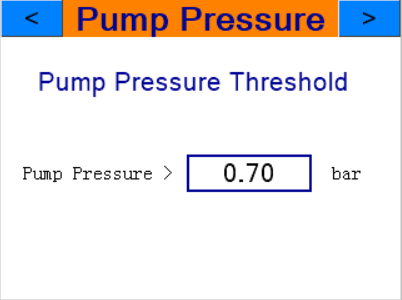
Press ▶️ to go to the next page. This is the pump pressure threshold setting, used to determine whether the pump is running. In Auto mode, this is used to decide whether to release CO₂ into the system when pH exceeds the configured range.
Typically, sand filter pool systems show approximately 0.8-1.1 bar when the pump is running. If in this range, you might set the threshold at 0.7 bar to allow the system to operate when pressure exceeds 0.70 bar. You can check the pump pressure while the pump is running from the main screen (Pump Pressure reading).
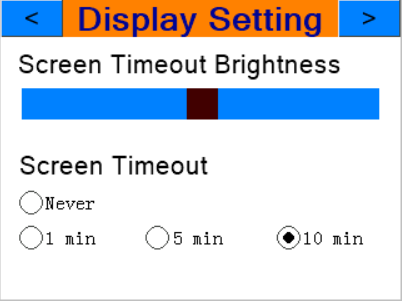
Press ▶️ to go to the next page. This configures the screen dimming after inactivity. You can drag the black slider to set brightness from 0-100%. This brightness level will be applied after the configured Screen Timeout period.
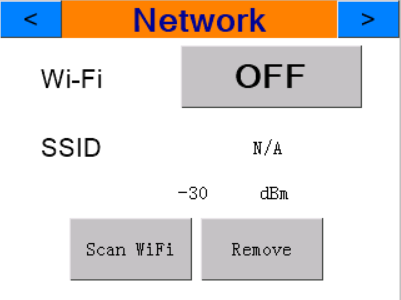
Press ▶️ to go to the next page. This is the Wi-Fi connection settings (if there is no Wi-Fi signal in the area, you can skip this step — the device can operate normally without it).
Turn Wi-Fi ON
Press Scan Wi-Fi
Select the desired Wi-Fi SSID, enter the correct Wi-Fi password, then press Save
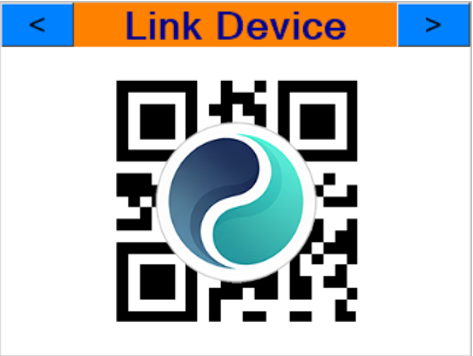
Press ▶️ to go to the next page. This is for connecting the device to your mobile phone and registering initial usage. See Activate Device & Connect to Mobile for details.

 Full Documentation
docs.elxense.com
Full Documentation
docs.elxense.com
 WEB/APP
app.elxense.com
WEB/APP
app.elxense.com